Style guide
UI text should be understandable by anyone, anywhere
UX writing best practices · Word choice · Grammar and punctuation
Pronouns
Use second person pronouns ("you")
Use the second-person pronouns “you” and “your” to help the user to feel like the UI is talking to them and referring to their actions
Do

Write from the user’s point of view to help them take action
Don't

Avoid writing that sounds impersonal and robotic
Don’t combine first and second person
Avoid mixing "me" or "my" with "you" or "your.” It can cause confusion to see both forms of address in the same context.
Do

Write from a user’s point of view by emphasizing their perspective with “you” and “your”
Don't

Don’t mix different forms of address in the same screen. Instead, use “you” and “your” or get rid of the pronoun.
Use caution with “I” and “we”
When written on behalf of a large, global company like Google, “we” or “I” may come across as robotic or disconcerting.
Focus on the user’s point of view, rather than Google’s, and consider if it’s possible to rewrite a phrase without “we.”
Don't
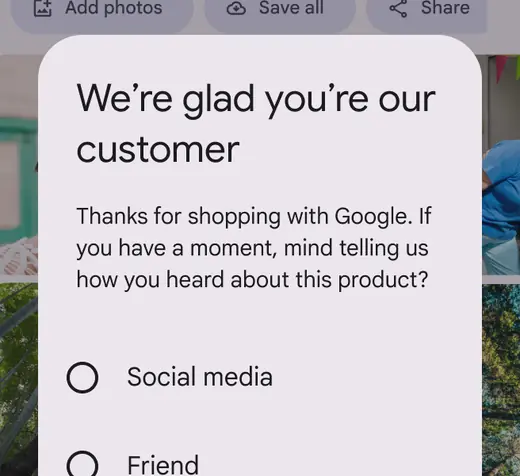
Don’t use first person pronouns to speak for the voice of Google
Don't

Avoid using first person pronouns. Write from the user’s point of view by using second person pronouns or removing pronouns altogether.
Some legal texts may merit an exception: “I” or “my” (the first person) emphasizes ownership in agreements or acknowledgments. For example, “I agree to the terms of service.”
Do
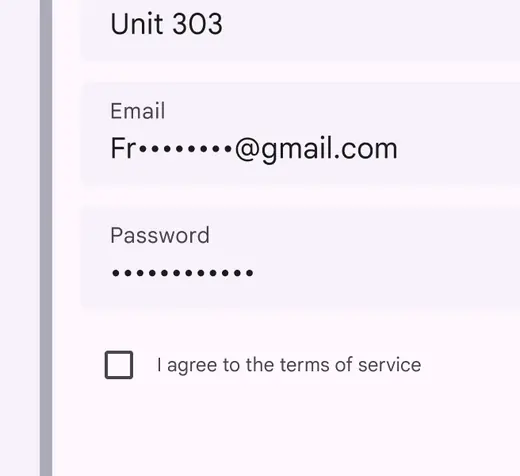
First person pronouns can help users understand when they’re making impactful decisions
Caution

Use caution with “we” or “our.” Even when these pronouns represent real people employed by Google, seeing first person pronouns in UI text can be confusing or jarring.