---
url: /foundations/xr/components/nav-rail.md
description: Learn how Material 3 Expressive components adapt to extended reality devices
---
# XR components
Learn how Material 3 Expressive components adapt to extended reality devices
[Overview](overview.md) · [App bars](app-bars.md) · [Dialogs](dialogs.md) · [Nav bar](nav-bar.md) · **Nav rail** · [Toolbars](toolbars.md)
::: info Note
XR guidelines are primarily intended for designers. Find what’s implemented in code in the [design kit](https://www.figma.com/community/file/1035203688168086460).
:::
Extended reality (XR) interfaces have special design requirements, like showing apps in 3D space. Material has an XR navigation rail with custom specs and guidance. See [XR developer documentation](http://developer.android.com/design/ui/xr/guides/foundations) for more details.
## Variants
There are two variants of navigation rail [orbiters](https://developer.android.com/design/ui/xr/guides/spatial-ui#orbiters "Orbiters are floating elements that control the content within spatial panels."): the contained FAB and spatialized FAB navigation rails.
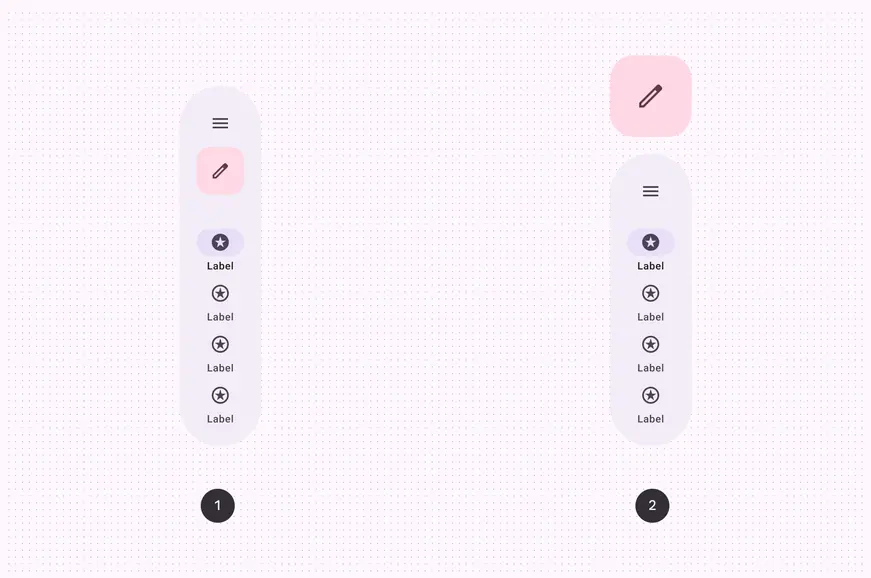
1. Contained FAB rail
2. Spatialized FAB rail
## Anatomy
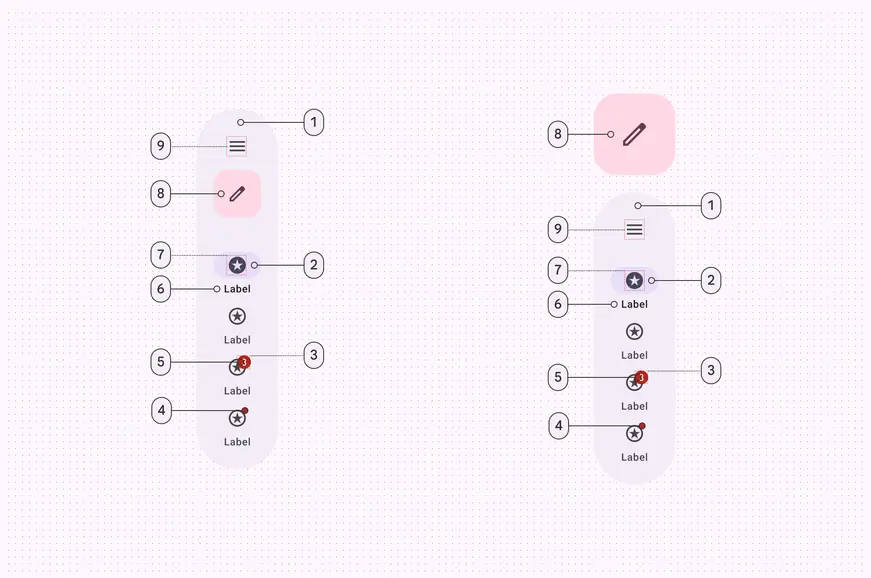
1. Container
2. Active indicator
3. Large badge (optional)
4. Badge (optional)
5. Large badge label (optional)
6. Label text
7. Icon
8. Embedded or spatialized FAB (optional)
9. Menu icon (optional)
## Color & elevation
On XR, color is used to highlight elevated UI elements and orbiters. With [spatial elevation](https://developer.android.com/design/ui/xr/guides/spatial-ui#spatial-elevation), the navigation bar displays above the [spatial panel](https://developer.android.com/design/ui/xr/guides/spatial-ui#spatial-panels), on the Z-axis. Color communicates elevation on UI elements and orbiters. Elevated nav rails can use any of these color options:
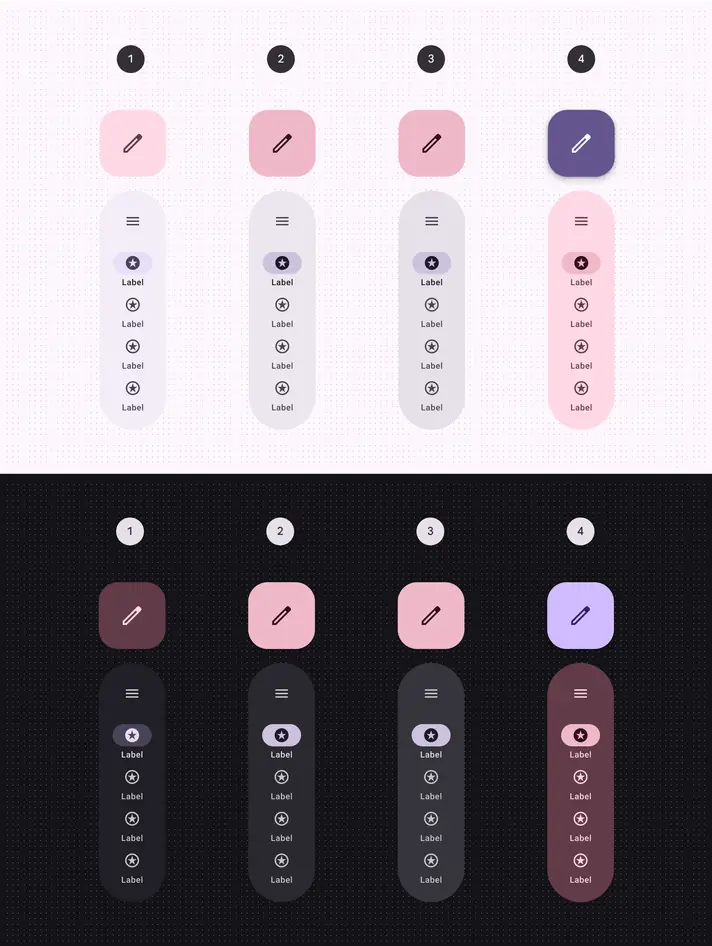
1. Surface container with tertiary FAB
2. Surface container high with tertiary fixed dim FAB
3. Surface container highest with tertiary fixed dim FAB
4. Tertiary container with primary FAB
## Measurements
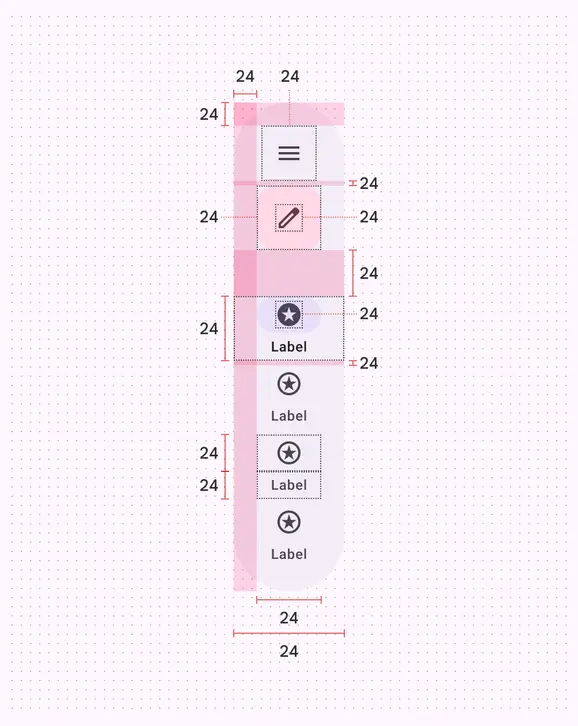
Navigation rail orbiter padding and measurements with contained FAB
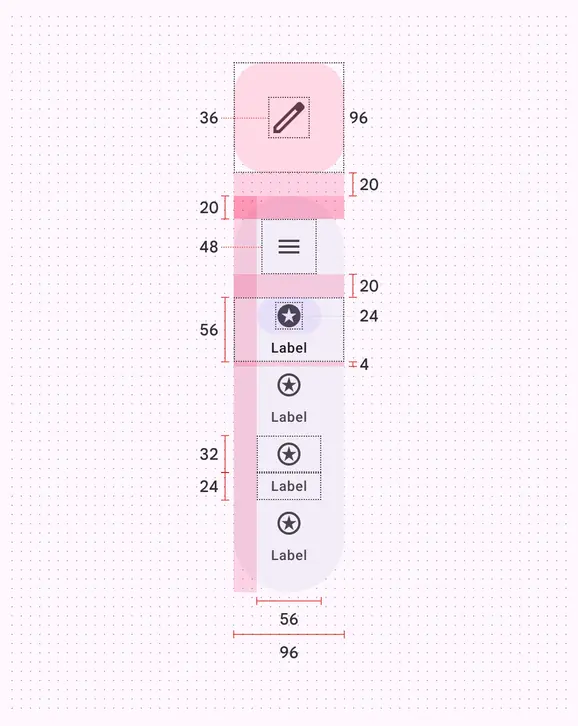
Navigation rail orbiter padding and measurements with spatialized FAB
## Usage
In [full space](https://developer.android.com/design/ui/xr/guides/foundations#modes "Full space is Android XR’s immersive mode and supports spatial components."), a navigation rail can appear in an orbiter for a more immersive experience. Currently, spatial capabilities, such as [orbiters](https://developer.android.com/design/ui/xr/guides/spatial-ui#orbiters "Orbiters are floating elements that control the content within spatial panels."), are only available in full space. In [home space](https://developer.android.com/design/ui/xr/guides/foundations#modes "Home space is compatible with mobile and large screen apps, but doesn’t support spatial components."), use a regular navigation rail on the same plane as the body content to mimic a 2D experience.
Navigation rail orbiter behavior and placement changing when going from a 2D to a 3D experience
## Behavior
### Global context
Intended for global navigation, a nav rail orbiter should be centered along the left or right edge of the app it controls. It stays anchored to the app during layout or content changes to ensure controls are easy to find.
::: tip Do
A navigation rail orbiter should be placed in global context, centered and anchored to the left or right of the app
:::
### Local context
Don’t place a navigation rail orbiter in local context or [between spatial panels](#d965ae72-bd1b-45a9-b4d3-d1d542e72087). Local placement can make controls hard to find. Nav rails are designed for app-level navigation, so should only use the global context.
::: danger Don't
Avoid placing a navigation rail orbiter in local context. It can be hard to find if placed between two spatial panels.
:::
## Placement
### Navigation context
The position of the navigation rail orbiter should communicate its navigational context:
* Use [**offset positioning**](https://developer.android.com/design/ui/xr/guides/spatial-ui#orbiters "Offset positioning is when orbiters are placed adjacent to spatial panels without overlap.") for global actions that affect the overall app experience
* Use [**inset positioning**](https://developer.android.com/design/ui/xr/guides/spatial-ui#orbiters "Inset positioning is when orbiters overlap with spatial panels.") for local actions that are specific to a spatial panel
A navigation rail orbiter can either overlap or be positioned adjacent to spatial panels with a 20dp margin for visual separation.
Position the navigation rail orbiter to reflect context: offset for global actions, inset for spatial panel-specific actions
### Inset positioning
Don’t obstruct content. To ensure a balanced and uncluttered layout, a navigation rail orbiter should overlap spatial panels by 12dp and no more than half their width.
::: danger Don't
Avoid overlapping an inset navigation rail orbiter by more than half its width
:::
### Vertical alignment
A navigation rail orbiter can be aligned to the top, middle, or center of spatialized panels, providing different levels of visual prominence and accessibility.
Align the navigation rail orbiter based on the specific design and user experience goals for the application.
Align the navigation rail orbiter at the top or center of spatialized panels
The navigation rail orbiter placement shouldn't exceed the height of adjacent spatial panels.
::: danger Don't
The navigation rail orbiter shouldn’t exceed the height of the spatial panel
:::
### Spatial panel alignment
Avoid placing a navigation rail orbiter between spatial panels. This negatively affects the interface structure.
Navigation rail placement can be adjusted to accommodate specific needs, such as improved ergonomics or [right-to-left (RTL) languages](../../layout/bidirectionality-rtl.md).
For layouts that span more than two spatial panels, consider using a [navigation bar orbiter](nav-bar.md).
::: danger Don't
Don't place a navigation rail orbiter between spatial panels
:::
## Spatialized FAB
There are two variants of navigation rail orbiters with different FAB treatments:
* **Contained FAB rail:** A contained FAB within the rail. This offers a compact and familiar layout.
* **Spatialized FAB rail:** The FAB becomes an orbiter of its own and is placed outside the navigation rail orbiter. Use this for higher emphasis and a distinct spatial effect.
Use the spatialized FAB rail to emphasize key actions and leverage XR hierarchy. Use the contained FAB rail to be more subtle, and align the experience with the baseline navigation bar.
Choose between a navigation rail orbiter with a contained FAB or a spatialized FAB
To maintain visual association, place the spatialized FAB in close proximity to the navigation rail orbiter. Material recommends a 20dp margin.
The spatialized FAB can be placed above or below the navigation rail orbiter.
Position the spatialized FAB close to the navigation rail orbiter
While the spatialized FAB and navigation rail orbiter are typically positioned together, their placement is adaptable.
::: warning Caution
Use caution when positioning spatialized FABs. Keep them within the height of adjacent spatial panels
:::
## Accessibility considerations
[XR accessibility](../design/accessibility.md) guidelines are still evolving. XR navigation rails should follow applicable Material [nav rail accessibility standards](../../../components/navigation-rail/accessibility.md).